
The V18 version is feature complete. The new beta has an upgraded web client / Windows app and Microsoft Teams integration as well.
New Web Client Interface with BLF Support:
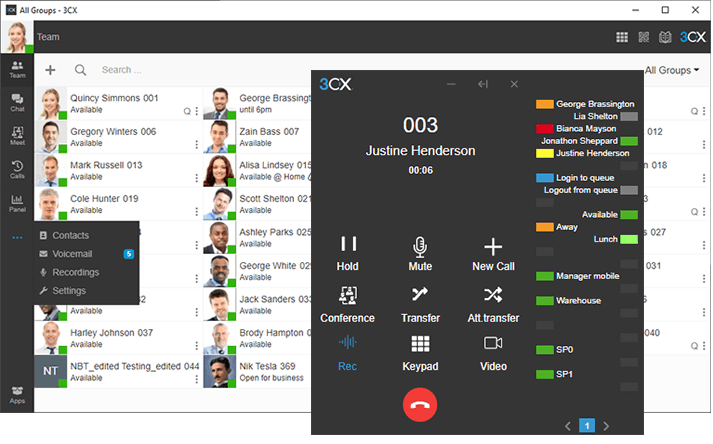
To make the functionality of each item clearer, menu options on the left-hand side of the web client and desktop app has been consolidated by adding labels. Now “More” menu list contains Contacts, Voicemail, Recordings, and Settings.
3CX dialer now comprises a BLF menu that functions just like BLF buttons on an IP Phone. Available monitor, transfer, or park calls and speed dial to the most commonly dialed extensions.
Microsoft Teams Integration:
3CX now supports Microsoft Teams. Teams users will be able to dial 3CX users and vice versa now with Microsoft teams integration. Teams users can get 3CX’s extensive SIP trunk provider support by dialing out via 3CX. It is budget-friendly as users can save on expensive MS365 calling plans.
Significantly 3CX PBX features are more enhanced than Teams phone system features. Configuration of 3CX PBX features is simple.
Additional Features & Improvements:
- Capability of sending emails from 3CX by using Microsoft 365 Integration
- Chat handling is improved to Add/remove chats, transfers & forwarding images.
- Updated Welcome Email
Footnote on Update:
- Deplored Mail Server selection for Outlook, Office365, and Gmail: On backup & restore these will be set as Custom SMTP.
- PBX with Bridge configuration: Both PBXs must be running on the same V18 version if one is using bridges to communicate between one PBX and another
Known Issues:
Identified issues in this Beta version, to be fixed in the next update:
- Transferring from Teams to another Team’s user leads to an error response 403 Forbidden.
- If the trunk is configured without the “PBX Delivers Audio Enabled” option then “Record External calls only” is enabled in extension settings, which could lead to no audio
Bits Secure IT Infrastructure LLC is the top 3CX Platinum partner in UAE. We have strongly certified and experienced engineers handling complex deployments. We at Bits Secure IT can help you to manage your voice network without hassle, be it a new configuration or maintaining your existing system.
For all your queries contact us at support@bitssecureit.com